How to use Gong with a CRM it doesn't natively support
Field Notes · Andrew O'Driscoll, Founder, RevOps Sherpas · Jul 2026 · 6 min read
Native Gong support covers Salesforce, HubSpot, and Dynamics. If your CRM is something else, you have two real options — build it or buy it. Here's how to decide.
How do you use Gong when your CRM isn't Salesforce, HubSpot, or Microsoft Dynamics — the three it supports natively?
You can get there. The real question is whether you want a one-off integration or one built to last.
A lot of teams run something else. They run NetSuite because the whole business runs on NetSuite. They run Zoho, or Pipedrive, or SugarAI (formerly SugarCRM), or ConnectWise, or a recruiting platform like Bullhorn where the pipeline is shaped around candidates and the companies hiring them. These are systems a company chose for reasons that have nothing to do with Gong, usually years before Gong entered the picture. Connecting them is entirely doable. What it comes down to is what kind of integration you end up with, and who keeps it healthy over time.
The easy part, and the hard part
You can build it using the Gong API and your CRM's API. And with AI coding tools, you can get something moving data fast. A basic sync, records flowing into Gong, working before long. That part has never been easier, and it's worth being honest about that rather than pretending the first mile is hard. It isn't anymore.
What's hard is everything after that first sync.
Bidirectional, not just inbound. Pulling CRM data into Gong is the straightforward direction. Deciding what flows back to the CRM, when, and which system's value wins when the same record changes in both places, is the harder one, and it's where a quick build tends to stop.
Configurable by your team, not hardcoded. A sync only its author can change is a liability. The real version lets your Gong admins choose which fields come in and adjust how it behaves without a dev cycle every time. Build it without that layer, and every later change — a renamed field, a new object — becomes a ticket back to whoever built it.
Reliable as both platforms move. Your CRM versions. Gong updates its CRM API. A connection that worked on day one needs someone keeping it working as the ground shifts underneath it, indefinitely.
The distance between a script that moves data and a product your team can depend on is most of the real work. Building it yourself makes sense when you have engineering capacity to spend, you want full control over how everything maps, and you're prepared to carry that work for the life of the system. Those are real conditions, and some teams meet them.
What a commercial integration is that a one-off build isn't
The other path is a partner-managed integration, and the difference is a difference in kind, not just effort.
That's why we built CRM Connect. It isn't a one-off build, it's a commercial product: used across many customers, hardened by all of their edge cases, and improved continuously. That last point is the one a single-company build structurally can't match. An integration you build internally is only ever tested by your own data and your own edge cases. A product used across many companies is shaped by all of them, so the problems you'd otherwise discover the hard way have usually already been found and fixed.
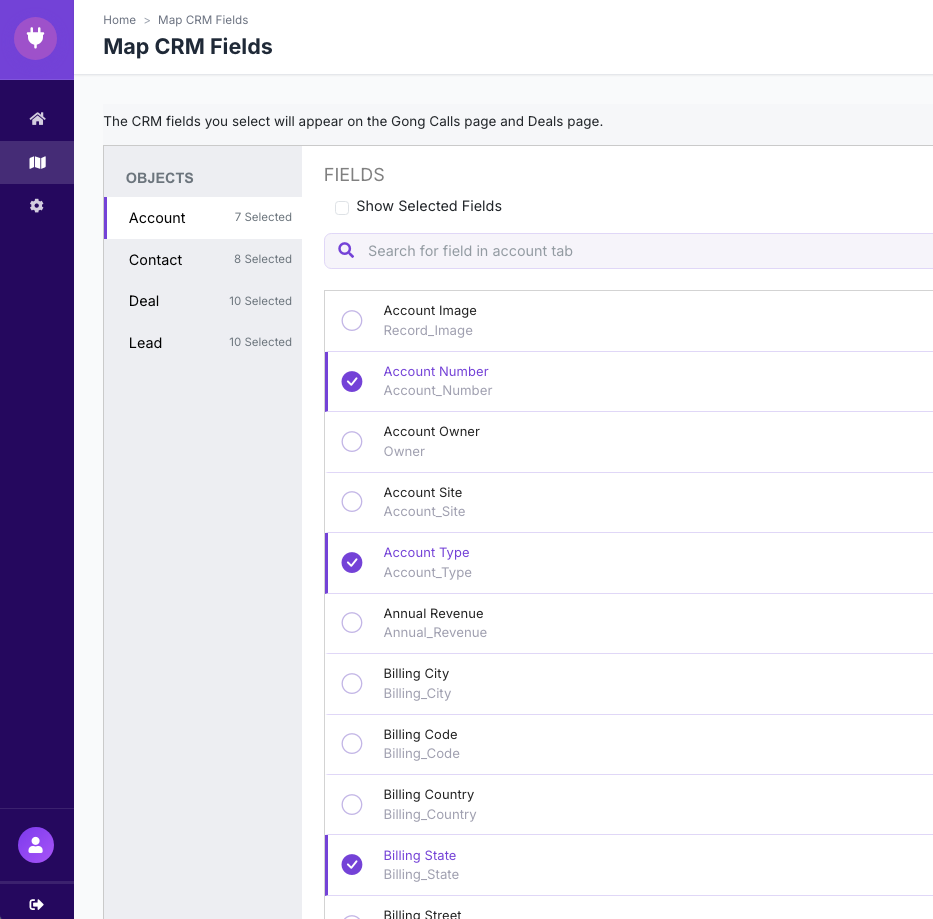
CRM Connect covers the CRMs Gong doesn't natively support: Zoho, Pipedrive, SugarAI (formerly SugarCRM), NetSuite, ConnectWise, Bullhorn, and custom CRMs, with one or two new CRMs added each quarter. The translation layer is already built, in production, and running across those systems. We monitor the sync, handle the errors, and absorb the API changes on both sides — your CRM's and Gong's — for the life of the contract. The configuration sits with your admin, not your engineers: a visual field picker reads the fields on each of your CRM objects — accounts, contacts, leads, deals — and lets your admin choose which ones to bring into Gong, sync direction and conflict rules are toggles rather than tickets, and built-in diagnostics show which record, which field, and why when something needs attention. Clicks, not code.
In practice that's a two-way flow, running on a set cadence — record changes sync from the CRM into Gong and from Gong back to the CRM every 15 minutes. For NetSuite, it pulls NetSuite data into Gong and writes data back through the NetSuite API, working around the table count and intricacies NetSuite carries. For a recruiting system like Bullhorn, it brings both pipelines — the hiring companies and the candidates — into Gong, so the team has visibility across both. On a CRM we already support, a team is usually live in a day or two. A connector we haven't built before is usually a month or less.
And it keeps moving forward. As we add capabilities like MCP, every customer on the integration gets them, without staffing a roadmap of their own.
Why the CRM connection is worth getting right
Whichever path you take, the reason the connection matters is how much of Gong's value depends on it. Deal boards, email ingestion, AI briefs, call association, a full picture of the customer — all of it draws on CRM data. Bring that data in cleanly and the parts of Gong you actually bought it for start working. Bring it in sloppily, with fields that don't line up or objects that don't match, and those features read from bad data or don't work at all.
So the integration isn't a post-launch detail. It's the thing that determines whether the platform does what it was bought to do.
How to decide
Both paths end in the same place: your CRM data in Gong, mapped well enough that the deal boards, the AI briefs, and the rest work. The difference is what you're running and who keeps it moving.
If you have engineering time to spend and you want full control, build it, and plan to keep owning it as both platforms change. If you'd rather your team spend that time closer to your product and run something that's already proven and always improving, a commercial integration does that. Neither is the right answer in the abstract. It depends on what your team's time is worth and where you want to spend it.
If your CRM isn't one of Gong's three native ones, which approach fits your team?
From this post
Click any figure to open it full size.
Fig 1. CRM Connect — Configuration. Sync schedulers for both directions (CRM to Gong and Gong to CRM, every 15 minutes), historical-call export, where calls are associated in the CRM, and the current field-import summary.
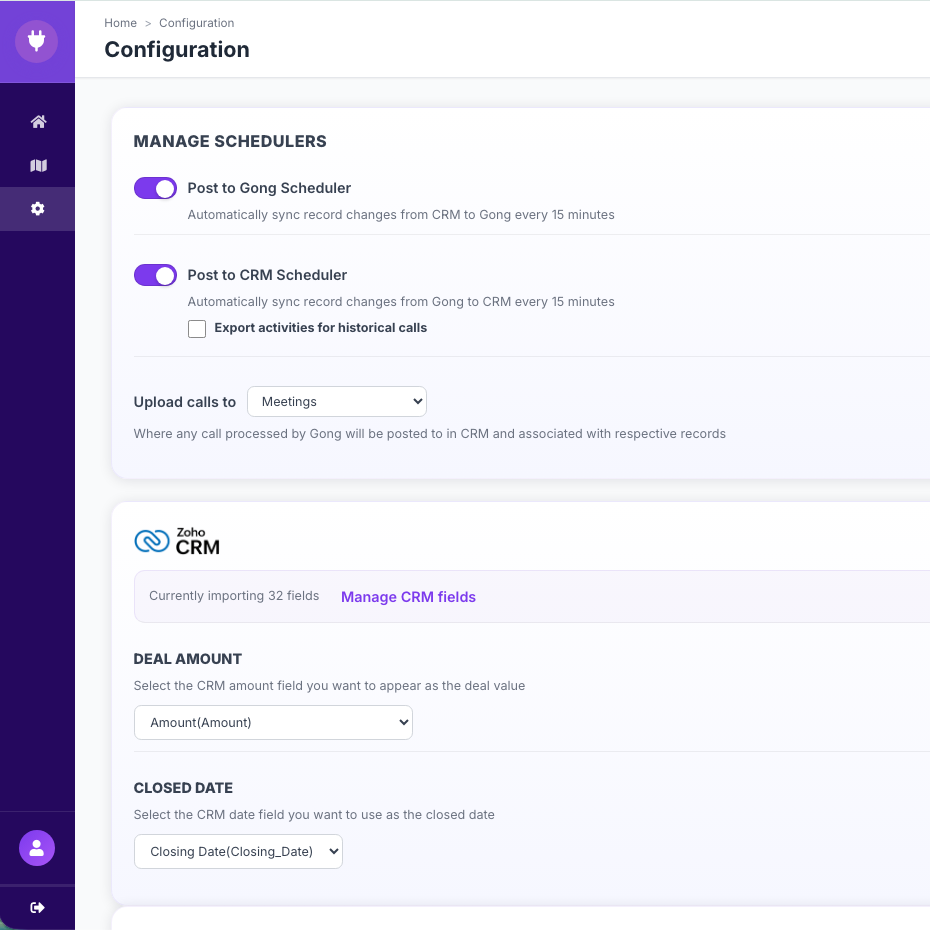
Fig 2. CRM Connect — Map CRM Fields. For each object (account, contact, lead, deal), the picker reads the CRM's fields and the admin checks which ones to bring into Gong.
Tags: Gong, CRM, Integration, CRM Connect